Create User Data
Control the PipelineDescription
Within the pipeline there are two ways to control or influence processes:
1. Global Settings – Adjusted through input dialogs before running a process.
2. Per-Material/Object/Tag Settings – Managed directly on materials, objects, and tags.
All of these settings use Cinema 4D User Data. By using Create User Data, you generate this information before running a pipeline process, giving you full control to adjust settings directly in the user data.
Create User Data
When you run Create User Data, it adds user data in two passes:
First Pass: Adds user data to materials.
Second Pass: Adds user data to selected objects and their pipeline-relevant tags.
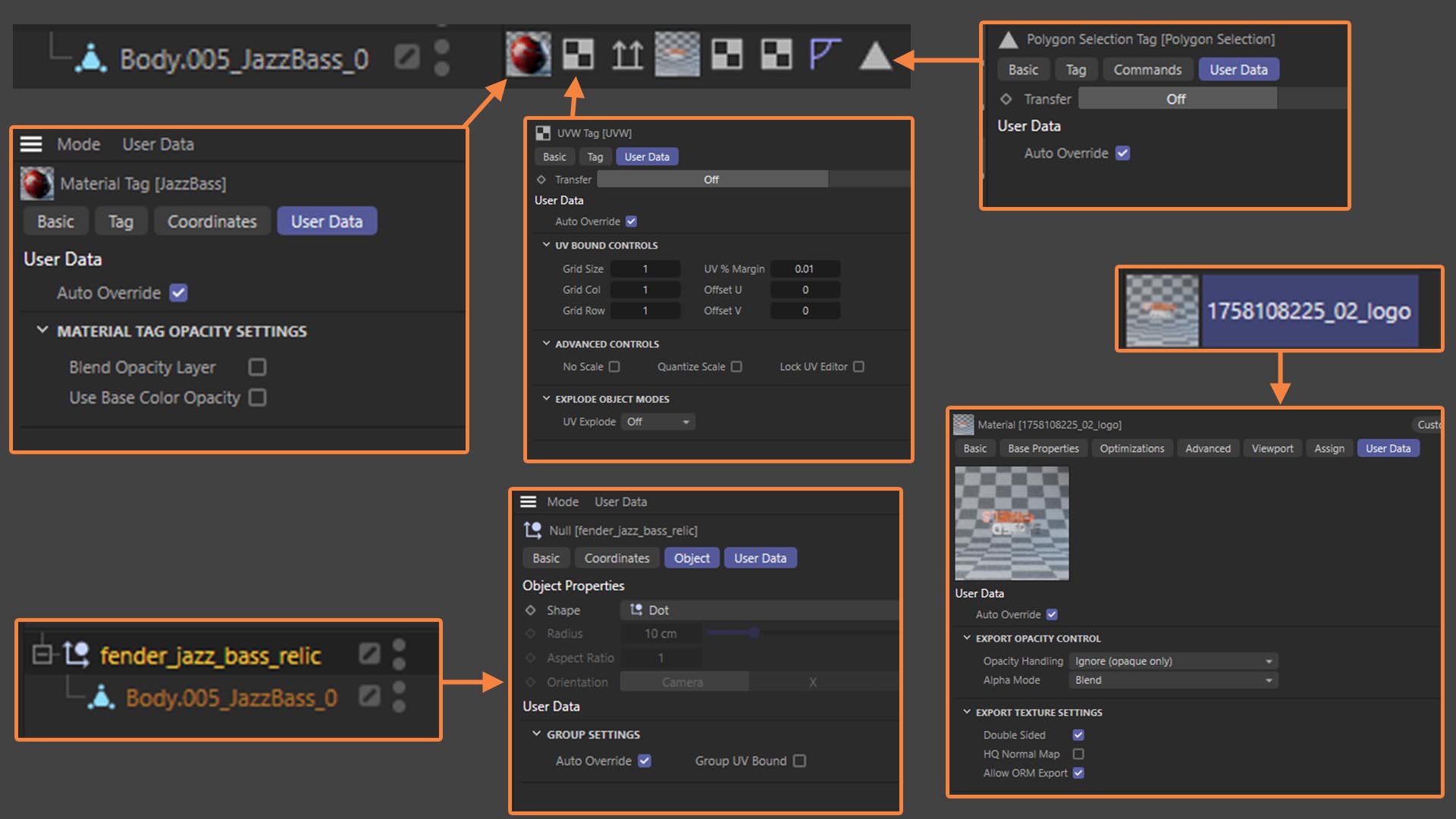
User data is generated on null objects, materials, material tags, UV tags, and selection tags.
Auto Override
The Auto Override setting is common to all objects and tags. It allows you to exclude an object, material, or tag from the pipeline processes, ensuring only the desired elements are processed.
User Data in Context
Null Object – Receives user data for use with the UV Bound command.
Material – Receives user data for use with the Export command.
Material Tag – User data here is used with the UV Transfer command.
Selection Tag – User data here is used with the UV Transfer command.
UV Tag – User data here is used with UV Bound, Explode Object, and UV Transform commands.